

Camera Crane vs 4-Point 3D Cable Cam System for Studios
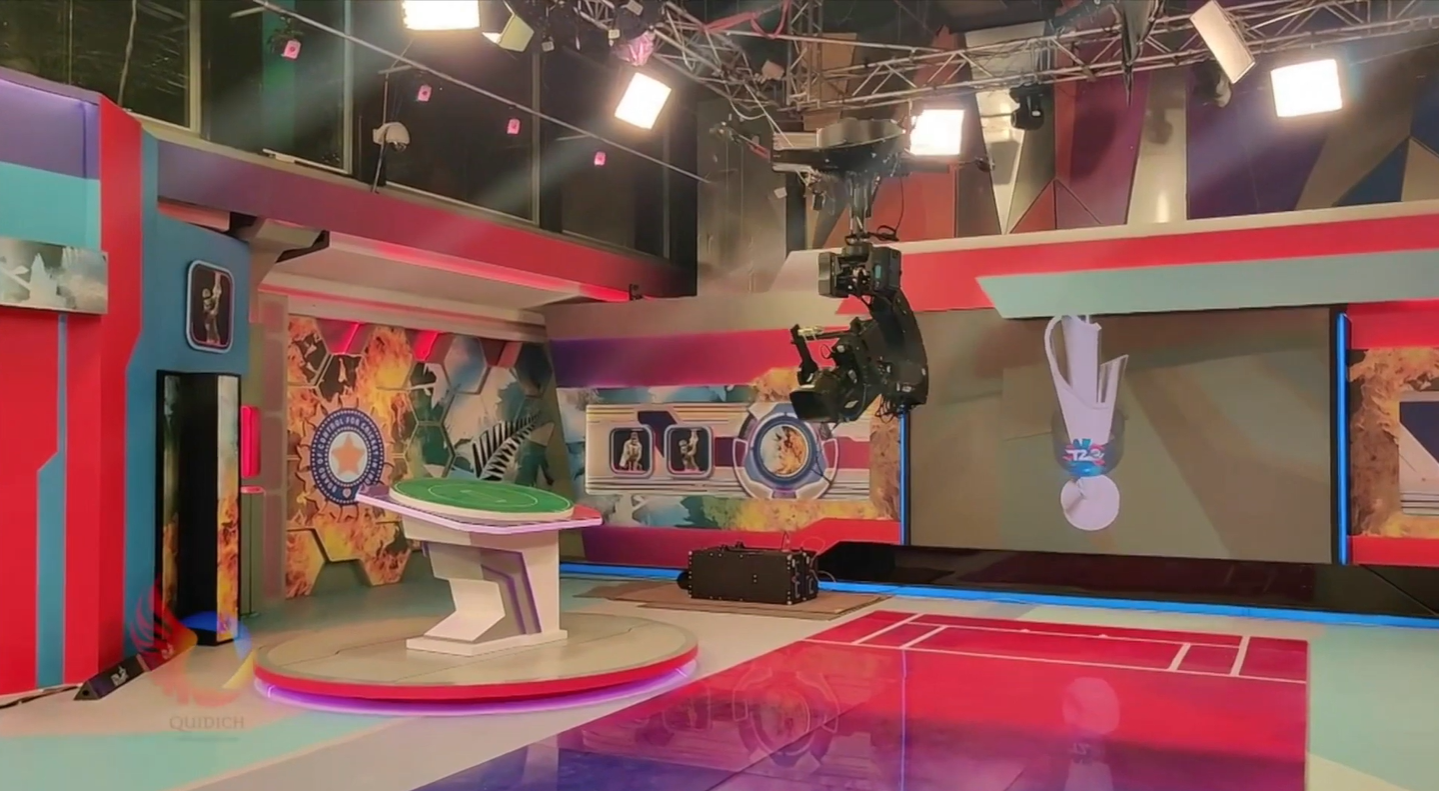
For studio setups, the choice between a ceiling-mounted motion control crane and a four-point 3D cable cam system usually comes down to motion freedom, ceiling height, rigging complexity, budget, and how many different use cases the equipment must cover. A four-point system gives the widest creative freedom because the camera can move through the studio volume in true 3D. A ceiling-mounted crane is usually more cost-effective, faster to rig, and often better for wide studios with limited ceiling height.
Both solutions can keep the studio floor clear. The right choice depends on whether the production needs full 3D flying movement across the entire space or practical motion-controlled overhead shots in a defined working area.
Both solutions can keep the studio floor clear. The right choice depends on whether the production needs full 3D flying movement across the entire space or practical motion-controlled overhead shots in a defined working area.
Article scope
This article compares a ceiling-mounted motion control crane with a four-point 3D cable cam system for studio environments.
It is written for broadcasters, studio owners, worship facilities, production companies, rental companies, and integrators who need to decide which overhead camera motion system fits their space and production workflow.
In JoyMechanix terms, this comparison often means evaluating a ceiling-mounted motion control crane such as Re:Crane against a four-point 3D cable cam system such as JM 1.3 Studio. The exact recommendation depends on venue size, ceiling height, rigging points, lighting layout, camera package, and the required shot style.
It is written for broadcasters, studio owners, worship facilities, production companies, rental companies, and integrators who need to decide which overhead camera motion system fits their space and production workflow.
In JoyMechanix terms, this comparison often means evaluating a ceiling-mounted motion control crane such as Re:Crane against a four-point 3D cable cam system such as JM 1.3 Studio. The exact recommendation depends on venue size, ceiling height, rigging points, lighting layout, camera package, and the required shot style.
What both systems have in common
A ceiling-mounted crane and a four-point 3D cable cam system can both be installed overhead.
This is a major advantage in studios because the floor remains clear for presenters, performers, audience seating, stage design, lighting stands, set changes, operators, and production crew.
Both systems can help solve one of the most common studio problems: how to create dynamic camera movement without placing a crane base, dolly track, or floor-mounted motion system inside the working area.
Both options can support:
This is a major advantage in studios because the floor remains clear for presenters, performers, audience seating, stage design, lighting stands, set changes, operators, and production crew.
Both systems can help solve one of the most common studio problems: how to create dynamic camera movement without placing a crane base, dolly track, or floor-mounted motion system inside the working area.
Both options can support:
- Overhead camera movement
- Zero or minimal floor footprint
- Motion-controlled operation
- Repeatable camera moves
- Integration with a stabilized remote head
- Professional broadcast workflows
- Safer movement planning through defined operating zones
This overlap is why the decision can feel difficult at first. From a distance, both systems can appear to solve the same problem. The difference becomes clear when you look at how they move in real studio conditions.
The main difference is motion freedom
The key difference is the type of movement.
A four-point 3D cable cam system provides true 3D camera movement. The camera is suspended by cables from four points and can travel across the working volume of the studio. Within the planned flying area, safety zones, and physical constraints, it can move from one side of the space to another and create a wide range of floating shots.
This gives directors a large creative envelope. The camera can glide across the studio, move diagonally, travel toward or away from the subject, change height, and repeat programmed paths.
A ceiling-mounted crane comes close to 3D movement for many practical studio shots, but it is not the same as a four-point system. It usually combines travel along a rail or truss line with arm movement and head movement. This creates multiple axes of motion, but the camera still operates within the geometry of the arm and rail.
For many studios, that is enough. A crane can deliver strong overhead motion, push-ins, pullbacks, side movement, reveal shots, and repeatable programmed moves. But it cannot provide the same unrestricted volume coverage as a four-point 3D cable cam system.
A four-point 3D cable cam system provides true 3D camera movement. The camera is suspended by cables from four points and can travel across the working volume of the studio. Within the planned flying area, safety zones, and physical constraints, it can move from one side of the space to another and create a wide range of floating shots.
This gives directors a large creative envelope. The camera can glide across the studio, move diagonally, travel toward or away from the subject, change height, and repeat programmed paths.
A ceiling-mounted crane comes close to 3D movement for many practical studio shots, but it is not the same as a four-point system. It usually combines travel along a rail or truss line with arm movement and head movement. This creates multiple axes of motion, but the camera still operates within the geometry of the arm and rail.
For many studios, that is enough. A crane can deliver strong overhead motion, push-ins, pullbacks, side movement, reveal shots, and repeatable programmed moves. But it cannot provide the same unrestricted volume coverage as a four-point 3D cable cam system.
When a four-point 3D cable cam system is the better choice
A four-point 3D cable cam system is the better choice when the studio needs maximum creative freedom across a larger working zone.
It is the right direction when the camera must move freely through the space, not only around one defined overhead area. It is also the stronger choice when the same equipment may need to be used in different studios, arenas, worship spaces, event halls, or partial stadium setups.
A four-point 3D cable cam system is usually better when the project needs:
It is the right direction when the camera must move freely through the space, not only around one defined overhead area. It is also the stronger choice when the same equipment may need to be used in different studios, arenas, worship spaces, event halls, or partial stadium setups.
A four-point 3D cable cam system is usually better when the project needs:
- True 3D movement across the studio volume
- Long diagonal travel
- Movement from one side of the studio to another
- Wide creative shot variety
- Floating camera movement over multiple zones
- Repeatable paths across a larger working area
- Flexible use across different venues
- A system that can scale beyond one studio layout
For example, JM 1.3 Studio is designed for studio and smaller venue environments, with a working diagonal up to 100 m and up to 130 m with extension. This makes it much more flexible than a fixed crane when the owner needs one system that can serve different layouts or larger future projects.
This flexibility is especially useful for rental companies. A crane may be excellent for one type of studio setup, but a four-point cable cam system can cover a wider range of project types if the venue conditions allow it.
This flexibility is especially useful for rental companies. A crane may be excellent for one type of studio setup, but a four-point cable cam system can cover a wider range of project types if the venue conditions allow it.
When a reversed crane is the better choice
A ceiling-mounted crane is often the better choice when the studio needs practical overhead 360-degree camera movement in a defined area, but does not need full 3D travel across the entire room.
This is where a system such as the JoyMechanix Re:Crane inverted jib can be especially useful. It can be mounted overhead on truss or rail, keeping the floor clear while creating smooth, motion-controlled camera movement over a stage, presenter area, audience zone, or performance space.
A ceiling-mounted crane is usually better when the project needs:
This is where a system such as the JoyMechanix Re:Crane inverted jib can be especially useful. It can be mounted overhead on truss or rail, keeping the floor clear while creating smooth, motion-controlled camera movement over a stage, presenter area, audience zone, or performance space.
A ceiling-mounted crane is usually better when the project needs:
- Lower cost compared with a full four-point 3D cable cam system
- Faster rigging
- Simpler installation along one truss or rail line
- Zero floor footprint
- Repeatable motion-controlled shots
- Strong overhead movement in one defined area
- Easier adjustment and lowering for setup or service
- Good performance in wide studios with low ceiling height
The crane is also practical when the production has a clear main camera zone. For example, in a studio where most shots happen around a presenter desk, stage, worship platform, or performance area, a ceiling-mounted crane can deliver the required movement without the added complexity of a four-point cable layout.
The trade-off is movement range. A crane is not as free as a four-point 3D cable cam system, but it can be more efficient when the production does not need that full freedom.
The trade-off is movement range. A crane is not as free as a four-point 3D cable cam system, but it can be more efficient when the production does not need that full freedom.
Ceiling height and sag: the most important studio constraint
Ceiling height is one of the most important factors in this decision.
A four-point cable cam system is affected by cable sag. The larger the working area, the more sag must be considered. This reduces the maximum usable flying height of the camera.
A simple planning logic is:
Usable flying height = pulley height - cable sag
This becomes critical in wide studios with relatively low ceilings.
For example, if a studio has a 20 m diagonal but only a 4 m ceiling height, the four-point system may have limited usable flying height. The camera may still move, but the available vertical space becomes restricted because the cable sag reduces the height at which the camera can safely operate.
A ceiling-mounted crane does not have the same cable sag limitation. It is limited by arm geometry and mounting position, but it can often reach closer to the usable ceiling height across its defined operating area.
This is why a crane can be the stronger option in wide, low-ceiling studios. The four-point system may offer more creative freedom in theory, but the ceiling height may reduce its practical value.
A four-point cable cam system is affected by cable sag. The larger the working area, the more sag must be considered. This reduces the maximum usable flying height of the camera.
A simple planning logic is:
Usable flying height = pulley height - cable sag
This becomes critical in wide studios with relatively low ceilings.
For example, if a studio has a 20 m diagonal but only a 4 m ceiling height, the four-point system may have limited usable flying height. The camera may still move, but the available vertical space becomes restricted because the cable sag reduces the height at which the camera can safely operate.
A ceiling-mounted crane does not have the same cable sag limitation. It is limited by arm geometry and mounting position, but it can often reach closer to the usable ceiling height across its defined operating area.
This is why a crane can be the stronger option in wide, low-ceiling studios. The four-point system may offer more creative freedom in theory, but the ceiling height may reduce its practical value.
Rigging and lighting grid coordination in studios
Rigging is another major difference.
A ceiling-mounted crane is usually faster and simpler to rig because it works along a single truss or rail line. The installation path is easier to define, and the system can often be lowered, adjusted, and serviced more quickly.
A four-point 3D cable cam system requires more planning. The four suspension points must be coordinated with the venue structure, cable paths, working zone, safety zones, and lighting grid.
Lighting grids can become an obstacle. They are usually not a blocker, but they do require coordination. In many studios, lighting fixtures may need to be repositioned so the cables and camera path remain clear.
This coordination is normal for professional studio installations. It just means the four-point system should be planned together with lighting, rigging, set design, and production teams early in the process.
A ceiling-mounted crane is usually faster and simpler to rig because it works along a single truss or rail line. The installation path is easier to define, and the system can often be lowered, adjusted, and serviced more quickly.
A four-point 3D cable cam system requires more planning. The four suspension points must be coordinated with the venue structure, cable paths, working zone, safety zones, and lighting grid.
Lighting grids can become an obstacle. They are usually not a blocker, but they do require coordination. In many studios, lighting fixtures may need to be repositioned so the cables and camera path remain clear.
This coordination is normal for professional studio installations. It just means the four-point system should be planned together with lighting, rigging, set design, and production teams early in the process.
Flexibility across multiple venues
The four-point system has a clear advantage when flexibility across different venues is important.
A ceiling-mounted crane is highly practical, but it is usually optimized around a defined working area and rail or truss position. A four-point cable cam system can be reconfigured for very different spaces as long as the rigging, height, span, and safety requirements are suitable.
This makes the four-point system stronger for owners who need one system for many applications.
For example, the same system class can be used in compact studio spaces, larger production rooms, event halls, worship environments, and partial arena setups. For larger venues, JoyMechanix also offers higher-range cable cam systems, including JM 2.3 Universal and JM 3.3 Industry.
The main point is that four-point cable cam technology is more scalable as a category. If the goal is multi-venue use, rental revenue, or long-term flexibility, the four-point system often has the stronger business case.
A ceiling-mounted crane is highly practical, but it is usually optimized around a defined working area and rail or truss position. A four-point cable cam system can be reconfigured for very different spaces as long as the rigging, height, span, and safety requirements are suitable.
This makes the four-point system stronger for owners who need one system for many applications.
For example, the same system class can be used in compact studio spaces, larger production rooms, event halls, worship environments, and partial arena setups. For larger venues, JoyMechanix also offers higher-range cable cam systems, including JM 2.3 Universal and JM 3.3 Industry.
The main point is that four-point cable cam technology is more scalable as a category. If the goal is multi-venue use, rental revenue, or long-term flexibility, the four-point system often has the stronger business case.
Practical selection framework
Use this framework when choosing between a ceiling-mounted crane and a four-point 3D cable cam system:
- Choose a four-point 3D cable cam system if the camera must move freely across the studio volume
This is the right choice when the production needs true 3D movement, long travel, wide creative freedom, and flexible use across different spaces.
- Choose a ceiling-mounted crane if the movement is focused in one defined area
This is the right choice when the production needs overhead motion above a stage, presenter, congregation, audience zone, or performance area, but does not need full-room 3D travel.
- Choose a crane if the studio is wide but the ceiling is low
Four-point systems are affected by sag. In low-ceiling studios, the usable flying height can become restricted. A crane can often be more practical in this situation.
- Choose a crane if rigging speed and budget are the main constraints
A rail or truss-mounted crane is usually faster to install and more cost-effective than a full four-point system.
- Choose a four-point system if the equipment must work across multiple venues
If the system is intended for rental work or different studio and event layouts, the four-point system gives broader flexibility.
Key takeaways
- Both ceiling-mounted cranes and four-point 3D cable cam systems can keep the studio floor clear.
- A four-point system provides true 3D camera movement across the working volume.
- A ceiling-mounted crane provides strong motion-controlled overhead movement, but with geometric limits.
- Cranes are usually more cost-effective and faster to rig.
- Four-point systems require more rigging and lighting grid coordination.
- In wide, low-ceiling studios, cable sag can make a crane more practical.
- For multi-venue use and maximum creative flexibility, a four-point cable cam system is usually stronger.
FAQ
Is a ceiling-mounted crane the same as a four-point cable cam system?
No. Both can be installed overhead and keep the floor clear, but they move differently. A four-point cable cam system provides true 3D movement across the working volume. A ceiling-mounted crane moves within the geometry of its rail, arm, and head.
Which solution is better for a studio?
It depends on the studio. A four-point 3D cable cam system is better for full-room movement and maximum creative freedom. A ceiling-mounted crane is better when the movement is focused in one area, the ceiling is low, rigging must be faster, or the budget is more limited.
Which solution is more cost-effective?
A ceiling-mounted crane is usually more cost-effective than a full four-point 3D cable cam system. It requires less rigging complexity and is often faster to install.
Which system is faster to rig?
A ceiling-mounted crane is usually faster to rig because it can be installed along a single truss or rail line. A four-point system needs four coordinated rigging points and more planning around cable paths, lighting grids, and safety zones.
Why does ceiling height matter for a four-point cable cam system?
Four-point cable cam systems are affected by cable sag. The larger the working area, the more sag must be considered. In a low-ceiling studio, this can reduce the usable flying height of the camera.
Can a four-point system be installed in a studio with a lighting grid?
Yes, but it requires coordination. Lighting fixtures may need to be repositioned so cables and camera movement paths remain clear. This is usually manageable if planning starts early.
When is Re:Crane better than a four-point system?
Re:Crane is better when the production needs overhead motion in a defined studio area, faster rigging, lower cost, zero floor footprint, and repeatable motion-controlled shots without full 3D cable coverage.
When is a four-point system better than Re:Crane?
A four-point system is better when the camera must move freely across a larger studio volume, travel from one side of the space to another, or serve multiple venues and production formats.
Conclusion
A ceiling-mounted crane and a four-point 3D cable cam system can both be excellent studio camera motion solutions, but they solve different problems.
Choose a four-point 3D cable cam system when the priority is true 3D movement, maximum creative freedom, wide coverage, and flexibility across different venues. Choose a ceiling-mounted crane when the priority is cost efficiency, faster rigging, clear floor space, reliable overhead motion in one defined area, or better usability in a wide studio with limited ceiling height.
The best decision starts with the real shot requirement: how far the camera must travel, how much height is available, how the lighting grid is arranged, and whether the system must serve one studio or many different spaces.
Choose a four-point 3D cable cam system when the priority is true 3D movement, maximum creative freedom, wide coverage, and flexibility across different venues. Choose a ceiling-mounted crane when the priority is cost efficiency, faster rigging, clear floor space, reliable overhead motion in one defined area, or better usability in a wide studio with limited ceiling height.
The best decision starts with the real shot requirement: how far the camera must travel, how much height is available, how the lighting grid is arranged, and whether the system must serve one studio or many different spaces.